Are Back Paddles Worth It for Sports Games on PS5?
Short answer: yes, back paddles can help in PS5 sports games, but the value depends on how you play. If you compete online, rely on advanced skill moves, or get hand fatigue after long sessions, paddles are worth serious consideration. If you mostly play casually against AI and rarely need quick modifier combos, the gain is smaller. The sweet spot is players who want quicker, cleaner inputs without lifting thumbs from the sticks.
Back paddles are extra buttons under your controller that you can map to any face or shoulder button. The biggest benefit is keeping both thumbs on the analog sticks, since your thumbs handle movement and precision aiming. In sports titles that demand fast dribbling inputs, icon switching, or jukes, that alone can shave small bits of delay and reduce fumbles, missed tackles, or blown possessions.
Let’s go game by game, hand position by hand position, and look at when paddles feel like a cheat code and when they feel like clutter.
What changes when you add back paddles
Sports games rarely need the hair-trigger precision of a shooter, but they often require multitasking at just the wrong moment: sprint while steering, protect the ball while faking, icon switch while scanning ahead. With default layouts on a DualSense, that usually means lifting a thumb from a stick to hit face buttons. Paddles let you shift one or two of those high-traffic actions to your middle fingers. You maintain full stick control during a combo, which is where tiny advantages add up.
In practical terms, paddles may save 50 to 150 milliseconds on a single action and prevent aiming drift that happens when a thumb leaves the stick. That can be the difference between holding a defensive line and biting on a cut, or placing a lead pass instead of firing it straight at a defender. The numbers are small, but the chain reaction is noticeable.
Ergonomics matter too. A lot of players press sprint with R3 by clicking the right stick, or hammer Circle or B repeatedly for shoulder charges, slides, or dumps. Over an hour of play, those motions add strain. Moving a spammy input to a paddle spreads the workload across more fingers, which feels smoother and reduces thumb fatigue.
Where paddles shine across popular PS5 sports titles
Every sports game uses a different control grammar. The gains from paddles follow the complexity of that grammar.
EA Sports FC / FIFA
Football asks for constant left-stick micro adjustments while juggling modifiers for sprinting, agile dribbling, knock-ons, jockeying, and skill chains. If you ever try to execute a heel-to-ball roll into a precision dribble then thread a through ball while shielding a defender, you know the dance.
Putting sprint or finesse modifiers on a paddle keeps both thumbs planted. You can chain a fake into a cut without the left stick wobble that comes from moving the thumb to a face button. Defensively, mapping jockey or contain to a paddle helps you feather position while reading runs.

The other place paddles help is icon switching in co-op or Clubs. Remapping icon switch to a paddle means you can flip targets while still shaping the pass or adjusting your run, which is especially handy for manual players.
NBA 2K
2K’s Pro Stick system lives on the right stick, and the left stick is always busy reading angles, bump steals, and transition paths. The two constant friction points are sprint and the combination of protect ball with dribble moves. Parking sprint on a paddle keeps your dribble timing intact. If you play point and chain size-ups into step-backs, that extra bit of control can stop the accidental crab dribble or commit.
On defense, quick actions like hands up, contest, and passing lane baiting benefit from never leaving the sticks. A paddle mapped to contest saves awkward thumb hops and slows down foul baiting. In tight games, that means fewer cheap fouls and more clean get-ups.
Madden NFL
Madden’s offense mixes stick steering with face-button reads. On a scramble, you may need to sprint, slide, and hit a throw on the run. Mapping sprint and a context action like slide to paddles cuts out a lot of thumb gymnastics. Ball carrier moves feel better too. Setting stiff arm or juke on a paddle lets you swerve a lane while throwing a move without bumping the stick off its path.
On defense, user LBs or safeties live and die on stick precision. If you map swat or hit stick to a paddle, you can maintain position instead of thumbing off to Square or Right Stick https://danteglth243.yousher.com/custom-ps5-controllers-with-swappable-thumbsticks-a-buyer-s-guide at the worst moment.
MLB The Show
Baseball is more about timing than multitasking, but paddles still help for fielding and baserunning. In directional hitting, paddles are minor. In Zone hitting, keeping thumbs on sticks while you check swing, bunt cancel, or steal adds comfort. Fielding, one paddle set for throw cancel and the other for a quick throw yields fewer wild tosses, since you stay aligned while deciding.
NHL
NHL’s skill stick system benefits similarly to 2K and FC. Paddles mapped to deke modifiers or vision control let you strafe and angle checks without a clumsy thumb jump. A lot of players map hustle or stick lift to a paddle to avoid losing edge control.
Rocket League, if it is your sports-like fix
It is not a traditional sports sim, but it sits here for many PS5 players. Back paddles are transformative in Rocket League because you can bind boost and jump to paddles and never leave air roll and directional sticks. If you are serious about car football, paddles are a massive upgrade.
The catch: not every paddle layout is a win
The first mistake is mapping everything. Two paddles are ideal for most sports titles. Four can feel crowded, and accidental presses cost possessions. The second mistake is shoving complex inputs to paddles without thinking about timing. A paddle mapped to a tap-hold contextual action can register at the wrong strength if your controller firmware is touchy. Keep paddles for on-off actions you hit constantly and that benefit from stick contact.
Hardware matters. Digital microswitch paddles feel crisp and are less prone to accidental long presses, which helps in games with pressure-sensitive inputs. Squishy paddles feel good on your fingers but need more travel and sometimes add latency in your timing. Try to test both styles before you commit.
The core benefit: thumbs stay on sticks
If you only remember one thing, make it this: paddles are worth it when they let your thumbs live on the sticks. That is the single trait that separates useful remaps from gimmicks. Any action you trigger while steering or aiming is a candidate for a paddle. Any action you hit at downtime, like opening a pause menu, is not.
Sample paddle mappings that work in real matches
Here are compact layouts that many players adopt and then fine-tune to taste. The aim is to keep your steering solid and reduce thumb liftoff. Try these as a starting point.
- EA Sports FC: Left paddle for sprint, right paddle for finesse or secondary function like jockey. Alternative defensive setup is left paddle for contain and right paddle for teammate contain.
- NBA 2K: Left paddle for sprint or protect ball, right paddle for pass or contest, depending on whether you are primarily a ball handler or a 3-and-D specialist.
- Madden NFL: Left paddle for sprint, right paddle for stiff arm or juke. On defense, swap right paddle to swat or hit stick as your user tool.
- MLB The Show: Left paddle for throw cancel or steal, right paddle for slide or jump. If you only play Road to the Show hitting, map check swing cancel to a paddle for comfort.
- NHL: Left paddle for hustle, right paddle for stick lift or vision control. If you favor dekes, reverse that and put the deke modifier on the left paddle.
Use these for a week, then adjust based on your pain points. If you keep slipping off diagonal sprints in FC while holding sprint, try moving sprint from a face button to a paddle. If you foul too often in 2K while contesting, assign contest to a paddle for a cleaner press.
Do paddles make you better, or just more comfortable?
Both. Early on, paddles make you more comfortable and reduce input error. After a few days, the muscle memory kicks in and the gameplay lift appears. Expect a ramp-up period of 3 to 5 sessions before you feel faster rather than confused. During that window you may even play worse because your brain reaches for old inputs.
A realistic improvement from paddles in sports titles is fewer mistakes rather than magical new skills. You will notice tighter dribbles out of traffic, fewer telegraphed passes, cleaner user switches, and steadier defense. Your split-second choices will still decide matches, but you will execute them with less hand drama.
Choosing the right controller and paddle style for PS5 sports games
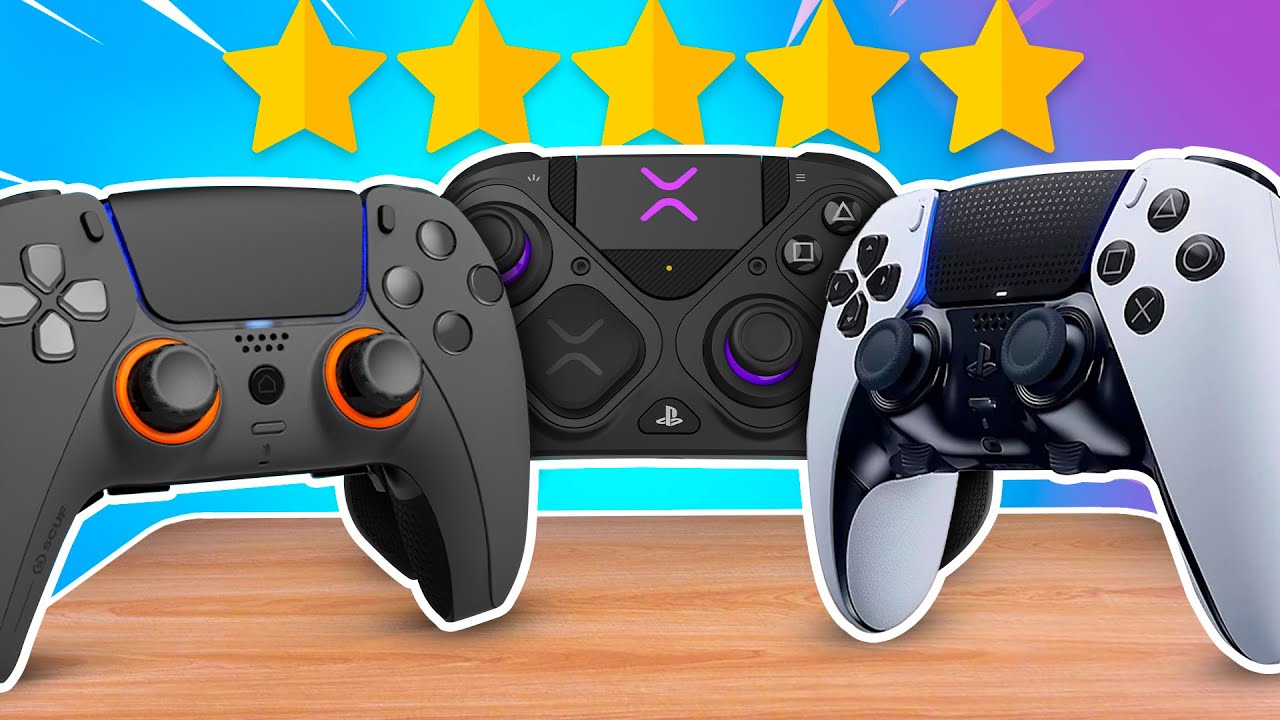
Sony’s DualSense Edge has two back buttons, adjustable triggers, and on-pad profiles. It is a safe, compatible route with good software. Third-party options like Scuf, Victrix, and Nacon offer different paddle shapes, extra buttons, or lighter shells. Build quality influences how confident you press during crunch time.
If you are exploring custom PS5 controllers, pay attention to:
- Paddle feel and placement. Short travel, distinct click, and a shape that your middle fingers find without thought.
- Trigger behavior. Sports games often want analog trigger range for acceleration or finesse shots. Trigger stops are less critical here than in shooters, unless you purely want faster actuation for repeated taps.
- Grip and weight. A slightly grippier finish is worth more in sports titles than ultra-light weight. Consistent grip means fewer slips while feathering sticks. Some builders offer textured finishes or modular shells with better airflow. You may see designs like Helico Hexavent shells, which emphasize ventilation and grip patterns. The benefit is small but real over a two-hour session where sweaty palms lead to micro-slips.
- Software remapping. In-controller memory is best. Relying on game menus is fine, but hardware-level remap profiles let you switch faster between FC and 2K sessions.
If you bounce between console and desktop, custom PC controllers with similar paddle layouts keep your muscle memory intact. Sports games on PC through Steam or publisher launchers accept the same remaps, so the habits carry over.
Cost versus gain: when is it truly worth it?
If you already rank high in online ladders or play in organized leagues, paddles are a no-brainer. The margin in tight games comes from doing the small things without stutter: contest at the right angle, switch icons without drifting, shield the ball while scanning. The cost is tiny compared to the hours you invest.
If you mostly play offline on moderate difficulty and do not pursue skill moves or manual layouts, a standard DualSense is fine. You will still feel the ergonomic comfort from paddles, but your match outcomes may not change much.
If you are injury prone or deal with hand strain, paddles can be a quality-of-life upgrade. Shifting spammy buttons to stronger fingers and reducing thumb clicks pays dividends even if your playstyle is chill.

Practical setup advice so you do not fight the hardware
Keep your first mapping minimal. Two paddles, two actions you hit constantly. Give it a week and resist the urge to tinker daily. Stability breeds confidence.
Bind actions that fire cleanly. Sprint, contest, protect ball, and contain are perfect. Avoid contextual actions that depend on analog strength unless your controller handles variable inputs well. If your paddle hardware is binary, mapping a half-press finesse throw in Madden will only frustrate you.
Train in real match flow, not only in practice modes. Spend a game playing defense-first to learn the timing, then an offense-only test game. If a mapping causes even one accidental press every few minutes, change the sensitivity or swap to a different action.
Use profiles if your controller supports them. One for FC, one for 2K, one for Madden. Keep the left paddle theme consistent across games where possible, like left paddle equals sprint or hustle. Your hands will thank you.
Common pitfalls that waste the advantage
Too much, too soon. Players slap four paddles on and remap half the controller. In sports titles with nuanced timing, that backfires. Accidental inputs are brutal in the box or during a two-minute drill.
Ignoring grip. Fancy paddles help less if your shell is slick. Consider a grippy finish, control freaks on sticks if you use them, or shells designed for airflow and traction like hex-pattern designs. Your thumbs staying rooted on the sticks is the whole point.
Chasing macros you cannot use. Most leagues and online ladders ban true macro sequences. Stick to one-to-one remaps that mirror existing buttons. The point of paddles is position and timing, not automation.
Copying shooter layouts. What works for Call of Duty often does not translate. Sports games need analog ranges and flow. Start fresh with sports-first logic.
What does the science of input time suggest?
You do not need a lab to feel it, but physics and anatomy are on your side. Lifting a thumb off a stick, moving to a face button, pressing, and returning to the stick is a multi-step motion with horizontal and vertical travel. A paddle press is a single downward squeeze in line with your grip. Even if the absolute difference is a fraction of a second, it occurs during high-leverage windows, which compounds.
Most of the gain is not from raw milliseconds, though. It is from maintaining control vectors. When your thumb leaves the stick, you often drift or lose the initial millisecond of correction. High-tier players respect that continuity more than the time saved.
Are back paddles legal in competitive play?
In most online modes, yes. Official esports events vary by organizer, but tournament rules usually allow controllers with extra buttons as long as there are no macros or turbo functions. If you plan to play in a league, read the equipment section carefully. Controllers like DualSense Edge and mainstream pro pads are commonly approved.
When paddles might not help much
If your playstyle is simple and you do not rely on modifier chains, paddles may feel unnecessary. Casual MLB players who swing directional, or FC players who rely on basic passing and sprinting with minimal skill moves, will notice more comfort than performance.
If you are extremely sensitive to grip shape, some paddle assemblies change how you hold the controller. It takes time to fix your grip so your fingers sit naturally on the paddles without white-knuckling.
If budget is tight, spend first on a reliable network and a monitor with low input lag. Those upgrades often outpace the gains from paddles if your setup is laggy.
Building a long-term edge with smart practice
Treat paddles like a position change. Focused drills convert hardware potential into results.
In FC, run 15 minutes of dribble cones with sprint on a paddle, practicing in-and-outs and La Croqueta chains, then hop into two Division Rivals matches and force yourself to use paddle-driven jockey on defense. In 2K, run scrimmage with protect ball mapped to a paddle while chaining size-ups, then spend a quarter in MyTeam or Rec playing defense-first with contest on a paddle. In Madden, set a custom practice where you user a linebacker and trigger swats or hit sticks from the paddle while keeping gap integrity.
Schedule one tweak per week. For example, week one assign sprint to the left paddle. Week two add contest or swat to the right paddle. Week three decide whether you need a second profile for defense. Incremental change keeps you sharp.
The bottom line for PS5 sports players
Back paddles are worth it for most competitive sports gamers on PS5 because they keep thumbs on sticks, clean up high-pressure inputs, and reduce fatigue. They do not replace game sense or tactics, but they make you more likely to execute the moves you already know.
If you decide to buy, prioritize paddle feel, reliable remapping, and a grippy shell over flashy extras. If you are customizing, explore options like textured finishes or Helico Hexavent shells for better hand traction and airflow, though treat those as comfort upgrades rather than performance guarantees. Keep your layouts simple, build muscle memory with small drills, and give yourself a week to adapt.
If you finish a session and realize you made fewer panicked mistakes, defended without drifting, and felt fresher in the final minutes, your paddles are doing their job. That is what worth it looks like in sports games: not gimmicks, just smoother control in the moments that decide the match.